Servers in stock
 Checking availability...
50% off 1st month on Instant Servers - code 50OFF +1-646-490-9655
Build your server
VirtualDJ • Streaming configuration tutorial

VirtualDJ Streaming Configuration Tutorial

Follow this step-by-step guide to configure VirtualDJ for live audio streaming with your Server Room SHOUTcast or Icecast server. Get your station live in minutes.

3-step guide SHOUTcast & Icecast 24/7 live support

Step-by-step guide

Follow each step carefully to configure VirtualDJ for live audio streaming with your Server Room server credentials.

1

Open the Broadcast settings

In VirtualDJ, click Settings, select the Broadcast tab, then click Radio Server to open the server configuration page.
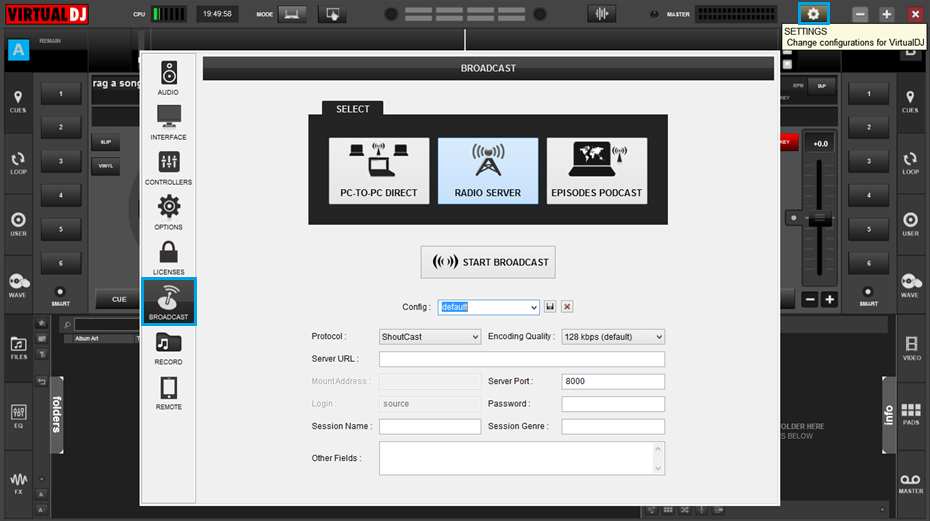
VirtualDJ - Settings, Broadcast tab, Radio Server Expand
2

Enter your server and station details

Configure the following fields:

  • Protocol — select SHOUTcast
  • Encoding quality — your streaming bitrate (default 128 kbps)
  • Server URL — your Server Room streaming address
  • Server Port — your assigned port number
  • Password — your streaming password

Under station information, enter your station title in Session Name, your genre in Session Genre, and a description in Other Fields.
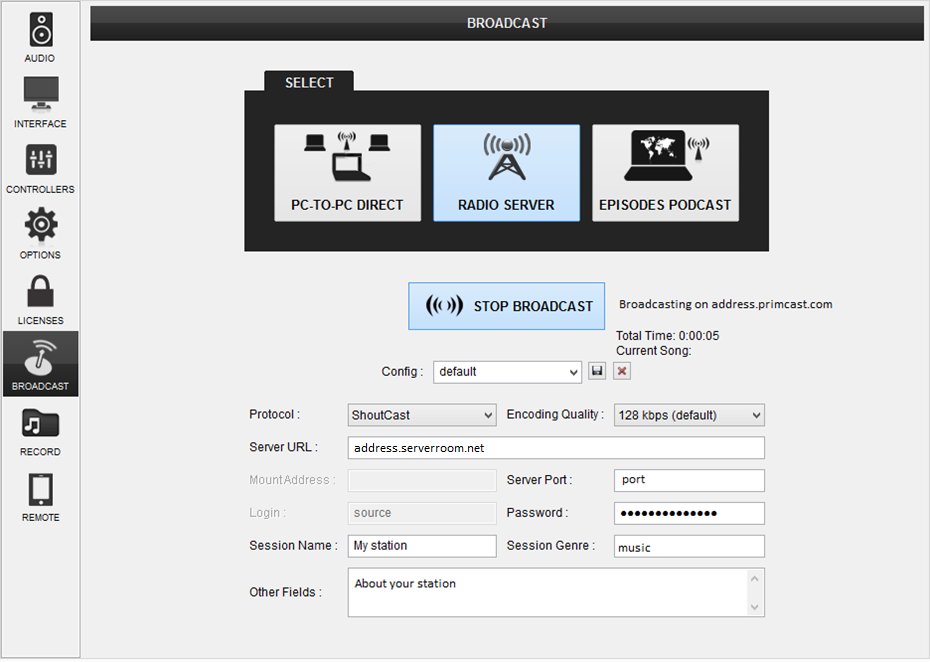
VirtualDJ - Server URL, port, password and station info Expand
3

Start broadcasting

Click the Start Broadcast button to connect to your Server Room server and begin your live stream.

FAQ

Common questions about configuring VirtualDJ for live streaming with Server Room.

Where do I find my streaming address, port and password?

Your Server Room streaming address, port, and password are available in your account dashboard under your radio server details.

Which protocol should I select — SHOUTcast or Icecast?

Select the protocol that matches your Server Room plan. Most Server Room radio plans use SHOUTcast. If you have an Icecast plan, select Icecast and enter your mount point.

What bitrate should I use for streaming?

The default of 128 kbps is recommended for most broadcasts. Lower bitrates (64–96 kbps) work well for listeners on slower connections.

Why does VirtualDJ fail to connect?

Check that your Server URL, port, and password are entered correctly. Make sure your Server Room radio service is active and that no firewall is blocking the streaming port.

Can I use VirtualDJ with both SHOUTcast and Icecast servers?

Yes. VirtualDJ supports both protocols. Select the appropriate one from the Protocol drop-down and enter the corresponding Server Room credentials.

Ready to go live?

Our audio and video streaming services include unlimited connections, unlimited bandwidth, and 24/7 expert support to keep you on air.









