Servers in stock
 Checking availability...
50% off 1st month on Instant Servers - code 50OFF +1-646-490-9655
Build your server
SimpleCast • Streaming configuration tutorial

SimpleCast Streaming Configuration Tutorial

Follow this step-by-step guide to configure SimpleCast for live audio streaming with your Server Room WMA streaming server. Get your station live in minutes.

4-step guide WMA streaming 24/7 live support

Step-by-step guide

Follow each step carefully to configure SimpleCast for live audio streaming with your Server Room WMA server credentials.

1

Open the Encoders window

Click the Encoder button on the main SimpleCast window. The Encoders window is where you configure one or more encoders — your Server Room streaming server will broadcast this encoder's feed to your audience.
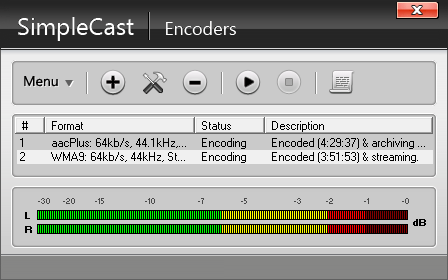
SimpleCast - Encoder button on the main window Expand
2

Add a WMA encoder and select a profile

Click the + button to add a new encoder and select WMA from the list. Click OK. In the WMA encoder window, go to the Profile tab and select the streaming profile that best matches your connection speed. Under Stream options, check Auto start encoder if you want the encoder to launch automatically with SimpleCast.
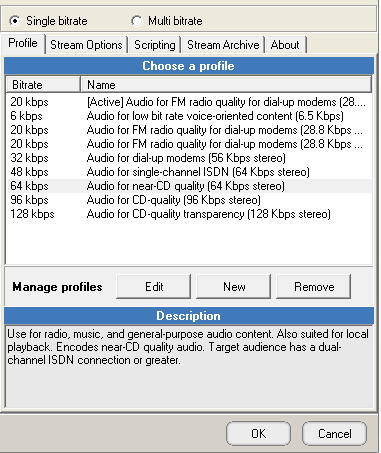
SimpleCast - Add WMA encoder and select profile Expand
3

Enter your Server Room credentials

Select Use PUSH distribution. Log in to your Server Room account to retrieve your WMA streaming details, then enter:

  • Publishing point — provided in your Server Room account
  • Username and Password — your Server Room WMA credentials

Check Auto reconnect encoder after under Error recovery to help SimpleCast recover automatically from network errors. Click OK to close the encoder window.
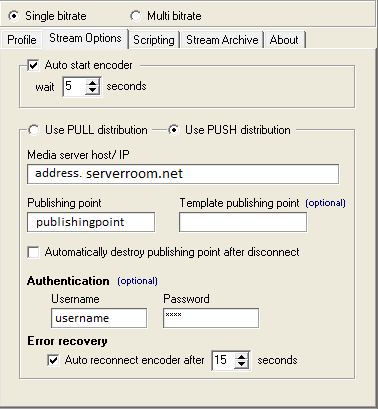
SimpleCast - PUSH distribution, publishing point and credentials Expand
4

Start streaming

Once your encoder settings are configured, press the Play button in the Encoders tab. Your stream is now live on your Server Room server.
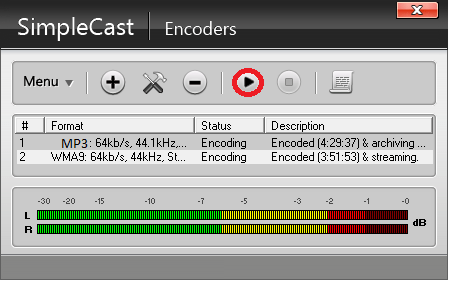
SimpleCast - Press Play to start streaming Expand

FAQ

Common questions about configuring SimpleCast for live streaming with Server Room.

Where do I find my Server Room WMA streaming details?

Log into your Server Room account dashboard. Your WMA publishing point, username, and password are listed under your radio server details.

What profile should I select in SimpleCast?

Select the profile that best matches your internet upload speed. For most broadband connections, a standard WMA profile at 64–128 kbps is suitable.

What does Auto reconnect encoder do?

Enabling Auto reconnect encoder after under Error recovery tells SimpleCast to automatically reconnect to your Server Room server if the connection is interrupted, keeping your broadcast as resilient as possible.

Why does SimpleCast fail to connect?

Verify your publishing point, username, and password are entered correctly. Make sure your Server Room streaming service is active and that no firewall is blocking the streaming connection. Contact our support team via live chat if the issue persists.

Can I run multiple encoders at the same time?

Yes. SimpleCast supports multiple encoders. Add additional encoders via the + button in the Encoders window, each with its own profile and server settings.

Ready to go live?

Our audio and video streaming services include unlimited connections, unlimited bandwidth, and 24/7 expert support to keep you on air.









