Servers in stock
 Checking availability...
50% off 1st month on Instant Servers - code 50OFF +1-646-490-9655
Build your server
Selenio Flex • Streaming configuration tutorial

Selenio Flex Streaming Configuration Tutorial

Follow this step-by-step guide to configure your Selenio Flex encoder for live video streaming via RTMP to your Server Room server. Get your stream live in minutes.

4-step guide RTMP / Flash streaming Hardware encoder

Step-by-step guide

Follow each step carefully to configure your Selenio Flex encoder for live RTMP streaming with your Server Room server credentials.

1

Access the web interface and add a streaming group

Power on the Selenio Flex encoder and connect to its web interface using the provided IP address. The default IP is 10.10.10.10.

Click the Add button to create a new streaming group and select your output profile. Flash/RTMP is recommended for Wowza and Server Room streaming services.
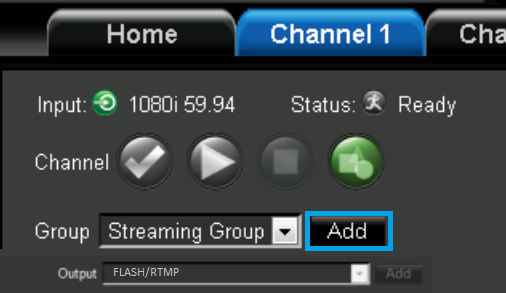
Selenio Flex - Add streaming group, select RTMP profile Expand
2

Enter your server credentials

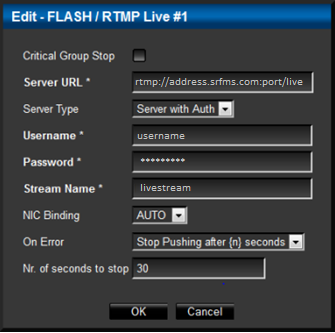
In the server information section, set Server type to Server with Authentication. Enter your details:

  • Server URL — your Server Room RTMP address in the format rtmp://address.srfms.com:port/live
  • Stream name — your desired stream name
  • Username and password — your Server Room streaming credentials
Selenio Flex - Server URL, stream name, username and password Expand
3

Configure video and audio settings

Click Add in the audio/video bitrate section. Set your desired bitrate, format, frame rate, and sample rate. Click Add again for video to select your input device, and repeat for your preferred audio input.

Selenio Flex - Video and audio bitrate, format and input device Expand
4

Start encoding

Once your devices and settings are configured, click the Play button to start your encoding session and begin streaming to your Server Room server.
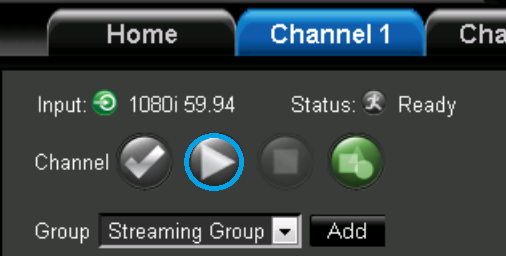
Selenio Flex - Play button to start encoding Expand

FAQ

Common questions about configuring the Selenio Flex encoder for live streaming with Server Room.

Where do I find my Server Room RTMP address and credentials?

Your RTMP server URL, stream name, username, and password are available in your Server Room account dashboard and in your Server Room setup email.

What is the default IP address of the Selenio Flex?

The default IP address is 10.10.10.10. Connect to it directly from a browser on the same network to access the web interface.

Which streaming profile should I select?

Flash/RTMP is recommended for use with Server Room's Wowza-based video streaming services.

Why does the Selenio Flex fail to connect?

Verify your RTMP URL, stream name, username, and password are correct. Make sure your Server Room video service is active and no firewall is blocking RTMP port 1935. Contact our support team via live chat if the issue persists.

Ready to go live?

Our audio and video streaming services include unlimited connections, unlimited bandwidth, and 24/7 expert support to keep you on air.