Follow this step-by-step guide to configure Caster X for live audio streaming with your Server Room SHOUTcast or Icecast server. Get your station live in minutes.
Follow each step carefully to configure Caster X for live audio streaming with your Server Room server credentials.
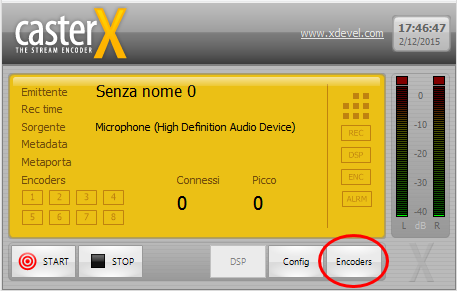
In Caster X, click Encoders in the bottom-right corner of the main window to open the encoder management panel.
 Expand
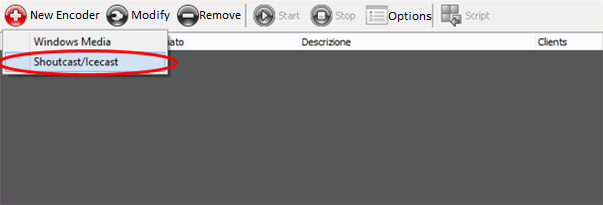
In the Encoders window, click Nouvo Encoder and select your streaming type — SHOUTcast or Icecast — to match your Server Room plan.
 Expand
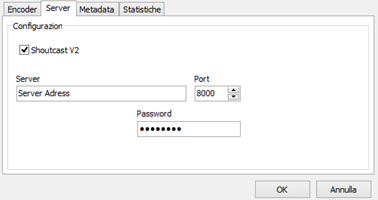
In the encoder properties window, set your audio format, channel, and bitrate. Then click the Server tab and enter your Server Room streaming address, port number, and password. These details are in your Server Room setup email and account dashboard.
 Expand
Click the MetaData tab and fill in your station name, genre, and website address. This information is not required but is recommended — it improves your station's visibility in public radio directories.
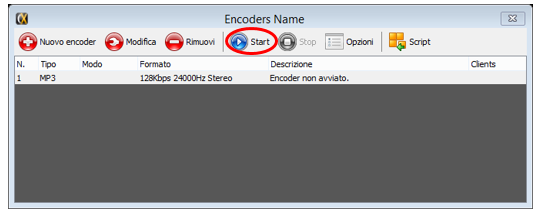
Click Start in the Encoders window, then click Start again in the Caster X main window to begin broadcasting to your Server Room server.
 Expand
Common questions about setting up Caster X with Server Room streaming services.










