Servers in stock
 Checking availability...
50% off 1st month on Instant Servers - code 50OFF +1-646-490-9655
Build your server
BUTT Encoder • Streaming configuration tutorial

BUTT Encoder Streaming Configuration Tutorial

Follow this step-by-step guide to configure BUTT (Broadcast Using This Tool) for live audio streaming with your Server Room SHOUTcast or Icecast server. Get your station live in minutes.

4-step guide SHOUTcast & Icecast 24/7 live support

Step-by-step guide

Follow each step carefully to configure BUTT for live audio streaming with your Server Room server credentials.

1

Add your server details

Click the Settings button to open the configuration panel. Click ADD and enter your Server Room SHOUTcast address along with your port number and streaming password.
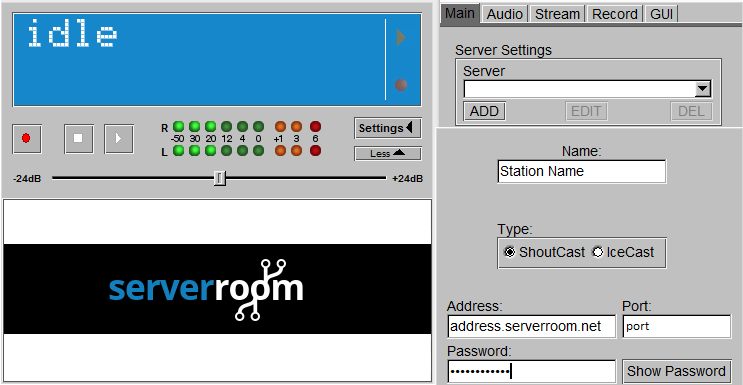
BUTT - Add server address, port and password Expand
2

Configure audio settings

Set up your audio settings for the broadcast. Use your default soundcard (Stereo Mix) as the input, MP3 as the format, 128 kbps bitrate, 44100 Hz sample rate, and Stereo channel mode.
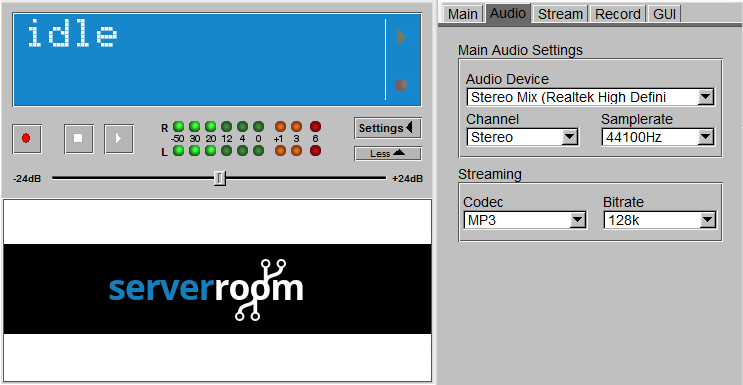
BUTT - Audio settings: MP3, 128kbps, 44100Hz stereo Expand
3

Add station information

Click Settings again and go to the Stream Infos section. Click Add and enter your station name, description, genre, and any other details you want listeners to see.
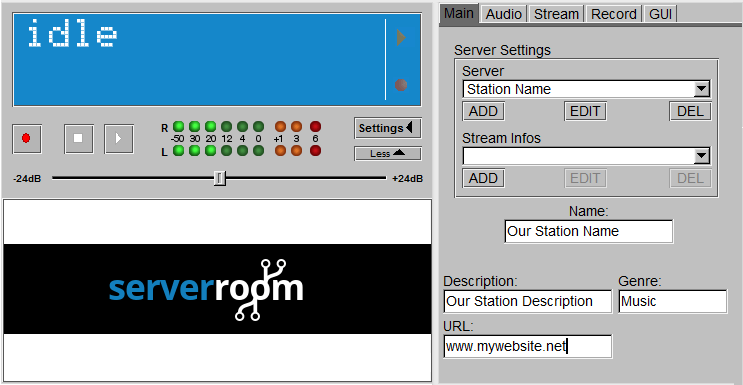
BUTT - Stream Infos: station name, description, genre Expand
4

Connect and go live

Once all settings are complete, click the Play button to connect to your Server Room server and begin broadcasting.
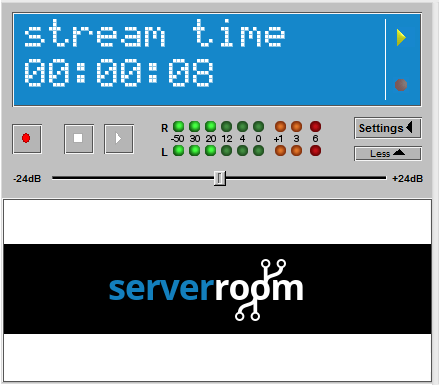
BUTT - Play button to connect and start streaming Expand

FAQ

Common questions about setting up BUTT encoder for live streaming with Server Room.

Where do I find my Server Room streaming address, port and password?

Log into your Server Room account dashboard. Your SHOUTcast or Icecast streaming address, port number, and source password are listed under your radio server details.

Which audio format and bitrate should I use?

MP3 at 128 kbps with a 44100 Hz sample rate on a stereo channel is recommended for most broadcasts. Lower bitrates (64–96 kbps) are suitable for listeners on slower connections.

Can I use BUTT with an Icecast server?

Yes. In the BUTT server settings, select Icecast as the server type and enter your mount point (e.g. /stream) along with your Server Room Icecast address, port, and password.

Why does BUTT fail to connect?

Double-check that your streaming address, port, and password are entered exactly as shown in your Server Room dashboard. Also ensure your firewall is not blocking the streaming port and that your Server Room radio service is active.

What should I do if listeners can hear silence or distortion?

Go to BUTT's audio settings and confirm the correct input device is selected. Make sure Stereo Mix (or the equivalent on your system) is enabled in your Windows Sound settings so BUTT captures audio properly.

Ready to go live?

Our audio and video streaming services include unlimited connections, unlimited bandwidth, and 24/7 expert support to keep you on air.









