Servers in stock
 Checking availability...
50% off 1st month on Instant Servers - code 50OFF +1-646-490-9655
Build your server
cPanel/WHM • DNS configuration tutorial

How to Configure Custom Name Servers in cPanel/WHM

Follow this step-by-step guide to set up your own custom name servers in cPanel/WHM. Point your domain to ns1 and ns2 records you control and take full ownership of your DNS.

8-step guide cPanel / WHM 24/7 live support

Step-by-step guide

Follow each step carefully to configure your own custom name servers in cPanel/WHM.

1

Set a proper server hostname

Your VPS must have a proper hostname such as server.mydomain.com, where mydomain.com is a domain you own and have added in cPanel/WHM. To change the hostname, go to:

Hypanel → Machine Settings → Set machine hostname
2

Log in to cPanel/WHM

Log in to your WHM control panel using your root credentials.

3

Open Edit DNS Zone

In WHM, search for Edit DNS Zone and click on it.

4

Select the domain to edit

Click on the domain you want to use for your name servers to select it, then click Edit.

5

Add ns1 and ns2 A records

Add two A records pointing to your VPS IP address:

  • ns1.mydomain.com → your VPS IP
  • ns2.mydomain.com → your VPS IP (if you only have one IP, both records can use the same IP)

Your VPS IP addresses are visible in the Hypanel.
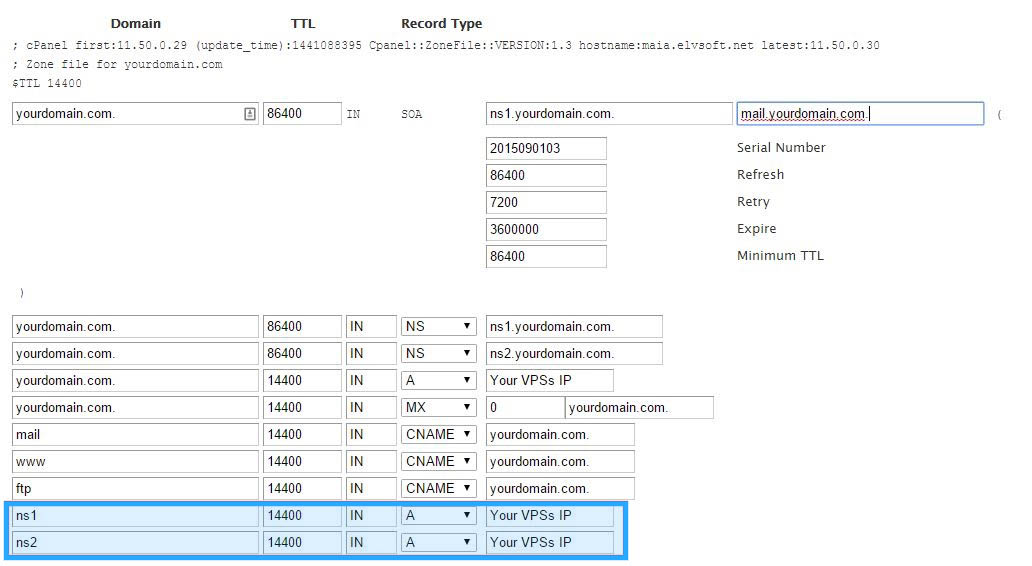
cPanel/WHM - DNS zone with ns1 and ns2 A records Expand
6

Save the DNS zone

Click Save to apply your DNS zone changes.

7

Register glue records at your domain registrar

Log in to the company where you registered mydomain.com and create glue records (also called host records or child name servers):

  • ns1.mydomain.com → your VPS IP (from step 5)
  • ns2.mydomain.com → your VPS IP (from step 5)

This tells the internet where to find your name servers.

8

Verify DNS propagation

After saving, check that your domain has the correct name servers by using a DNS lookup tool and querying mydomain.com for its NS records. DNS propagation can take up to 24–48 hours to complete globally.

FAQ

Common questions about setting up custom name servers in cPanel/WHM.

Why do I need a proper hostname before configuring name servers?

cPanel/WHM requires the server hostname to be a fully qualified domain name (FQDN) like server.mydomain.com. This ensures your server is correctly identified on the internet and prevents configuration errors when setting up DNS zones.

Can I use the same IP for both ns1 and ns2?

Yes. If your VPS only has one IP address, you can point both ns1.mydomain.com and ns2.mydomain.com to the same IP. Ideally, for redundancy, ns1 and ns2 should point to different IPs — but a single IP is sufficient for most setups.

What are glue records and why do I need them?

Glue records are A records registered at your domain registrar that associate your name server hostnames (e.g. ns1.mydomain.com) with IP addresses. They are required when your name servers are subdomains of the domain they serve — otherwise there would be a circular DNS dependency.

How long does DNS propagation take?

DNS propagation typically takes between a few minutes and 48 hours depending on TTL values and how quickly DNS resolvers around the world update their caches. Most changes are visible within 1–4 hours.

Can I get help setting this up?

Yes. Our support team is available 24/7 via live chat to assist with cPanel/WHM configuration, DNS zone setup, and glue record registration. Start a chat from this page and we'll walk you through it.

Need a server for cPanel/WHM?

Our dedicated and VPS server plans come pre-configured with cPanel/WHM and 24/7 expert support to keep your hosting environment running smoothly.









